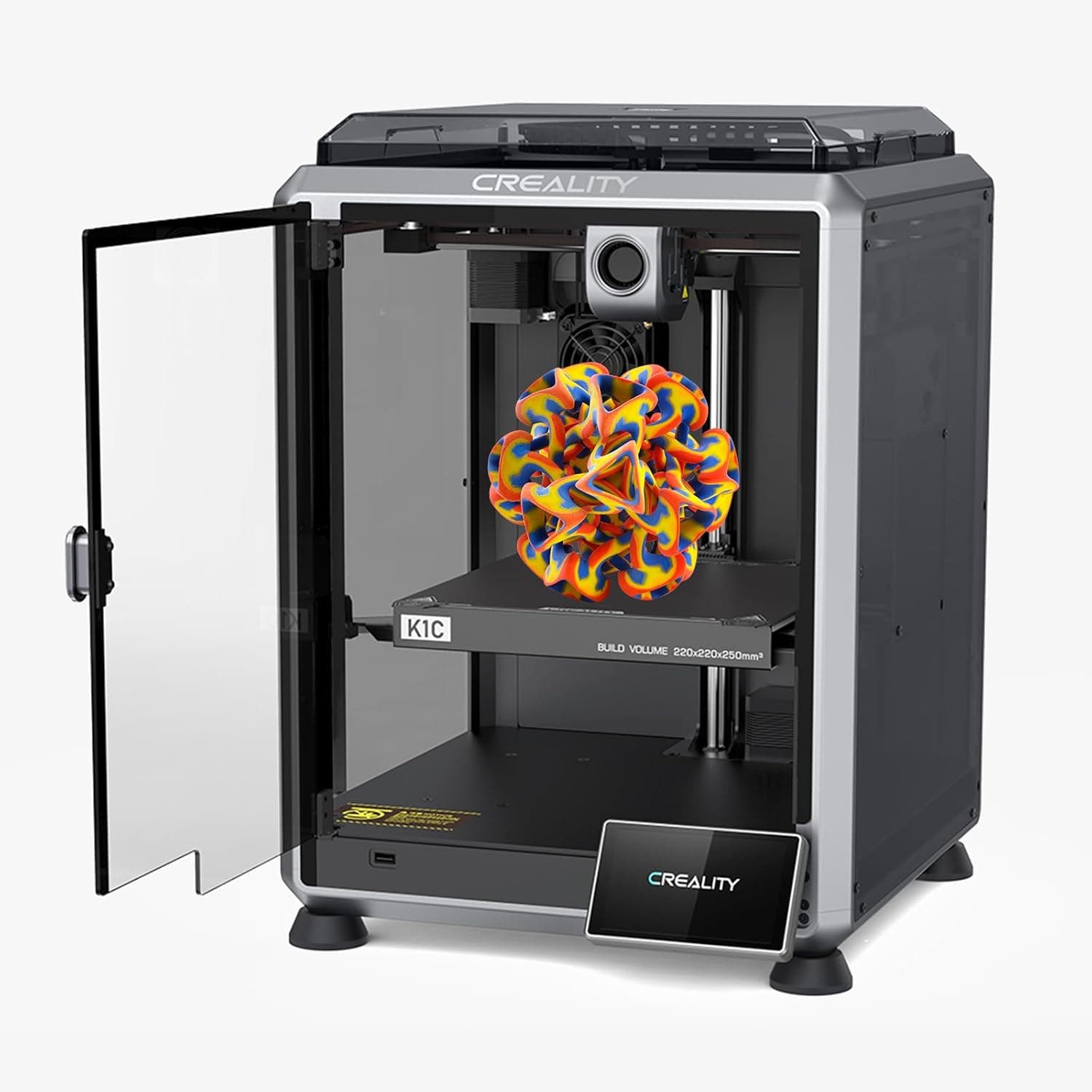
Creality K1C review UK: 600mm/s speed, AI camera failure detection, all-metal hotend for carbon fibre. Is this the best mid-range 3D printer for UK makers in 2026?
📊 Review Score Breakdown
Disclosure: This article contains affiliate links. As an Amazon Associate, AIToys.co.uk earns from qualifying purchases. We only recommend products we have thoroughly researched.
Creality K1C Review UK 2026 — The AI 3D Printer That Tames Carbon Fibre
The mid-range 3D printer market has become a brutal place to compete. Bambu Lab redefined expectations, Anycubic undercut on price, and Prusa kept the open-source faithful happy. Into this crowded segment Creality launched the K1C — a fully enclosed CoreXY machine with an AI failure-detection camera, a proper all-metal hotend, and a carbon-fibre-ready nozzle. The "C" stands for carbon, and that single letter tells you exactly who this printer is for.
After weeks of cross-referencing UK owner reviews, professional teardowns and long-term reliability reports, here is the honest verdict on whether the Creality K1C deserves a place on your workbench in 2026.
What Is the Creality K1C?
The Creality K1C is a CoreXY-style fused deposition modelling (FDM) 3D printer aimed at hobbyists and small-scale makers who want to print engineering-grade filaments such as carbon-fibre nylon (PA-CF), polycarbonate, ASA and PET-CF. It is the natural successor to the K1 and sits below the larger K1 Max in Creality's range.
Unlike its bedslinger cousins (the Ender series), the K1C uses a fixed bed with an X/Y gantry that moves the print head — a layout that allows much faster, more precise motion. Combined with a print volume of 220 x 220 x 250mm, an enclosed chamber, an AI-assisted camera and a quick-swap tri-metal nozzle, the K1C is positioned as a "serious tool, sensible price" machine for the UK maker scene.
If you are coming from the Bambu Lab side of the fence, think of the K1C as Creality's answer to the P1S — a fully enclosed CoreXY workhorse. We compared the original P1S in our Bambu Lab P1S review, and the K1C is squarely aimed at that same buyer.
Key Features at a Glance
The Creality K1C's headline specifications are genuinely impressive at this price point:
- Print speed: Up to 600mm/s with 20,000mm/s² acceleration
- Build volume: 220 x 220 x 250mm
- Hotend: All-metal, up to 300°C
- Nozzle: Quick-swap tri-metal hardened steel (carbon-fibre ready)
- Bed: Heated up to 100°C with PEI flexible plate
- Enclosure: Fully enclosed with active carbon filter
- AI camera: Built-in with failure detection and timelapse
- Levelling: Fully automatic array bed levelling
- Connectivity: Wi-Fi, USB, plus Creality Cloud and LAN-only modes
- Slicer: Creality Print (free) with Cura and OrcaSlicer compatibility
Check the latest price on Amazon
Setup Experience: Out of the Box in Under an Hour
Creality has clearly learned from years of customer feedback. The K1C arrives almost fully assembled — you remove a handful of foam blocks and packing screws, install the screen and filament holder, and you are essentially done.
The one-tap self-test runs through a sequence that includes vibration compensation, motor calibration, hotend PID tuning and bed levelling. On most machines this completes in around 15 minutes. By the time a UK first-time owner has unpacked the printer, configured Wi-Fi and walked through the on-screen prompts, the machine is already calibrated and ready to print the included Benchy.
This is significant because traditional Creality printers (the original Ender 3, for example) had a reputation for being fiddly. The K1C is a different beast entirely — it competes directly with Bambu Lab on the "open the box, hit print" promise.
What We Like About the Creality K1C
1. The AI Camera Genuinely Works
The most marketed feature on the K1C is its AI camera, and unlike a lot of marketing fluff, this one earns its keep. The camera watches the print live and uses on-board image recognition to detect "spaghetti failures" — the moment a print detaches and starts spewing a tangled mess of filament. When it spots a failure, the printer pauses automatically and pings your phone via the Creality Cloud app.
For anyone who has come home to a printer that has been chugging away producing a bird's nest for six hours, this feature alone is worth the upgrade. It is not perfect — UK reviewers note the AI occasionally misses failures on very dark or transparent filaments — but for standard PLA, PETG, ABS and carbon-fibre nylon in typical colours, it catches the vast majority of failures.
The same camera doubles as a timelapse generator, which is useful if you want to share builds on social media or document long prints for clients.
2. Carbon Fibre Without the Headaches
Printing PA-CF or PET-CF on a standard hobbyist printer used to be a recipe for blocked nozzles, hotend creep and abandoned spools. The K1C's all-metal hotend and tri-metal nozzle (steel core, copper alloy heat block, titanium throat) are specifically engineered to handle the abrasive nature of carbon-fibre filaments. The quick-swap design also means you can change nozzle types in under a minute if you want to switch between a 0.4mm hardened nozzle for carbon fibre and a 0.6mm brass nozzle for fast PLA prints.
For UK makers building drone frames, RC car parts or functional engineering prototypes, this is the headline upgrade over the older K1. If you want a sense of the market for printable RC components, our RC cars AI features and self-driving tech 2026 guide gives a good picture of why hobbyists print so many bespoke chassis parts.
3. Real 600mm/s Speed Without Layer Shifts
Plenty of printers claim 600mm/s on the spec sheet and then layer-shift the moment you push them past 200mm/s. The K1C uses a stiff CoreXY frame and proper input shaping (vibration compensation calibrated during the self-test), so the headline speed is achievable on real prints — not just empty travel moves. UK reviewers consistently report Benchy prints completed in 15 to 20 minutes at high-speed profiles, which is genuinely competitive with the more expensive Bambu Lab X1 Carbon.
4. A Properly Enclosed Chamber
The full enclosure is not just for looks. ABS and ASA filaments warp badly when they cool too quickly, and printing them in an open-frame printer in a draughty UK garage is an exercise in frustration. The K1C's enclosure traps heat and lets the chamber stabilise at a higher temperature, dramatically improving layer adhesion on engineering filaments. The active carbon filter also reduces VOC emissions, which matters if you are printing in a home office or bedroom.
5. Auto Bed Levelling That Actually Holds
The K1C uses a strain-gauge-based array levelling system that probes the bed at multiple points before each print. Combined with the rigid steel frame and a high-quality PEI plate, this means first layers rarely fail. Several months of UK owner reports suggest the machine holds calibration for weeks at a time without manual intervention.
Check the latest price on Amazon
What Could Be Better
We try to be honest in every review on AIToys.co.uk, and the K1C is not without its compromises.
Build Volume Feels Tight at This Price
A 220 x 220 x 250mm build volume is fine for most hobby parts, but at the £420–£550 price point you can find printers from rivals (and indeed Creality's own K1 Max) with significantly larger build plates. If you regularly print cosplay helmets, large mechanical assemblies or tabletop terrain, the K1C will feel restrictive. UK makers building bigger projects should consider stepping up to the K1 Max or an Anycubic Kobra 3 Max.
AI Camera Has Blind Spots
The failure-detection AI is excellent on PLA in standard colours, but it has measurable trouble with very dark filaments (matte black, deep navy) and transparent filaments. The camera also struggles in poorly lit rooms — Creality's documentation recommends ambient lighting, but a small LED strip around the printer is a sensible aftermarket addition.
Noise Levels Under Heavy Load
At cruising speed the K1C is similar in volume to a Bambu Lab P1S, but during high-speed travel moves and aggressive accelerations the cooling fans spin up audibly. It is not unbearable, but it is not "print in the bedroom overnight" quiet either. If silence matters, the Bambu Lab A1 Mini we covered in our Bambu Lab A1 Mini review is gentler — though that printer has its own trade-offs.
Creality's Software Ecosystem Lags Behind
Bambu Studio is genuinely polished. Creality Print is functional but feels a generation behind, and many enthusiast users end up running OrcaSlicer instead. This is fine — OrcaSlicer is excellent and free — but newcomers may find the choice between two slicers confusing on day one.
Who Is the Creality K1C For?
The K1C is built for a specific kind of UK maker. If any of the following apply, this printer should be on your shortlist:
- Functional-parts hobbyists who want to print drone arms, RC chassis, custom brackets, jigs and tooling in carbon-fibre nylon or polycarbonate
- Cosplayers and prop makers who need to print ASA and ABS in an enclosed chamber for rigid, paint-friendly parts
- Experienced PLA users ready to graduate to engineering filaments without buying a £1,200 flagship
- Small Etsy sellers running a print farm where AI failure detection saves real money on wasted spools
- STEM educators and parents of teenage makers who want a reliable printer that can grow with the user — see our broader Raspberry Pi 5 for Kids UK 2026 guide for adjacent ideas
It is not the right printer for absolute beginners who only want to print PLA models for their kids' bedroom shelves — the smaller, simpler Bambu Lab A1 Mini is gentler. It is also not the right printer for serious large-format work — the K1 Max or a dedicated large-format printer is a better fit there.
Value for Money
At a UK street price of around £420 to £550 (with regular Amazon promotions pushing it lower), the K1C delivers an unusual combination: enclosed CoreXY architecture, an all-metal carbon-fibre-ready hotend, AI failure detection and genuinely fast print speeds. Comparable enclosed CoreXY machines from Bambu Lab (the P1S) typically come in £100 to £200 higher once you add a comparable AMS or camera.
That said, the value calculation depends on what you actually print. If 90% of your output is PLA models for desk toys and decorations, you do not need a carbon-fibre-ready hotend — the cheaper Bambu Lab A1 Mini will save you money and produce arguably nicer prints out of the box. If you regularly print functional parts in engineering filaments, the K1C is one of the most cost-effective ways into that hobby in 2026.
For UK home use, factor in:
- Filament costs: Decent PLA from £18 per kg; PA-CF £40–£60 per kg
- Replacement nozzles: £8–£15 each (carbon fibre wears them)
- Build plate replacements: £25–£35 every 12–24 months of heavy use
- Electricity: Roughly 200–350W during printing — a few pence per print for typical jobs
Safety and Home Use Considerations
The K1C is rated for home use, but there are sensible precautions every UK buyer should take:
- Ventilation: The active carbon filter helps, but a well-ventilated room is still recommended for ABS and ASA prints
- Children and pets: The enclosed chamber means there are no exposed hot surfaces while printing, but children should still be supervised — the bed and hotend remain hot for 10–15 minutes after a print finishes
- Fire safety: As with any 3D printer, never leave a print running unattended for the first hour of operation, and keep the printer away from flammable materials. A smoke alarm in the same room is a smart investment
- Electrical: UK-spec PSU is fitted as standard. Plug into a surge-protected socket
- Filament storage: Carbon-fibre and nylon filaments absorb moisture rapidly — a filament dry box is effectively essential for these materials
Verdict — Should You Buy the Creality K1C?
The Creality K1C is the most quietly impressive printer Creality have produced in years. It is not the prettiest, the quietest or the most polished — that crown still goes to Bambu Lab — but on capability per pound it is hard to beat in 2026. The combination of carbon-fibre readiness, AI failure detection, full enclosure and genuine 600mm/s speeds at a sub-£550 price point makes it a serious workhorse for UK hobbyists who have outgrown their first PLA-only printer.
If you mostly print decorative PLA models, save your money and grab the Bambu Lab A1 Mini instead. But if you have ambitions of printing functional engineering parts, RC chassis, drone frames or production-grade jigs, the K1C earns its place on the bench.
Our rating: 4.5 / 5
Frequently Asked Questions
Can the Creality K1C print carbon fibre filaments?
Yes — the K1C is specifically designed for carbon-fibre composites such as PA-CF, PET-CF and PLA-CF. The hardened steel nozzle, all-metal hotend and tri-metal heat path withstand the abrasive nature of these filaments. Standard brass nozzles wear out within hours when printing carbon fibre, so the included tri-metal nozzle is genuinely important.
How does the K1C compare to the Bambu Lab P1S?
Both are enclosed CoreXY printers in a similar price band. The Bambu Lab P1S has a more polished software ecosystem and AMS multi-colour add-on, while the Creality K1C has a built-in AI camera and a tri-metal nozzle as standard. If you mainly print engineering filaments, the K1C edges ahead. If you want multi-colour PLA prints with the least friction, the P1S has the edge.
Is the K1C suitable for beginners?
It is more beginner-friendly than older Crealities, but it is still a more capable (and slightly more demanding) printer than the Bambu Lab A1 Mini. If this is your first 3D printer and you only want to print toys and figurines, the A1 Mini is gentler. If you want a single printer that can grow with you for several years, the K1C is a strong choice.
Does the AI camera require a subscription?
No. The on-device AI failure detection and the timelapse function both work without any paid subscription. You can also use the camera through the free Creality Cloud app to monitor prints remotely.
What slicers does it support?
Creality Print is the official free slicer. The K1C also works extremely well with OrcaSlicer (recommended by the enthusiast community) and Cura. Bambu Studio profiles can be adapted with some effort, but native support is best with Creality Print or OrcaSlicer.
Related Reading on AIToys.co.uk
- Bambu Lab A1 Mini Review — the best beginner-friendly 3D printer for UK families
- Bambu Lab P1S Review — the K1C's main rival in the enclosed CoreXY category
- Raspberry Pi 5 for Kids UK 2026 — pair a 3D printer with a Pi for serious projects
- RC Cars AI Features & Self-Driving Tech 2026 — print your own RC chassis parts on the K1C
Reviewed: 4 May 2026. Prices and availability change frequently — always check the current price on Amazon before purchasing.
As an Amazon Associate, AIToys.co.uk earns from qualifying purchases.