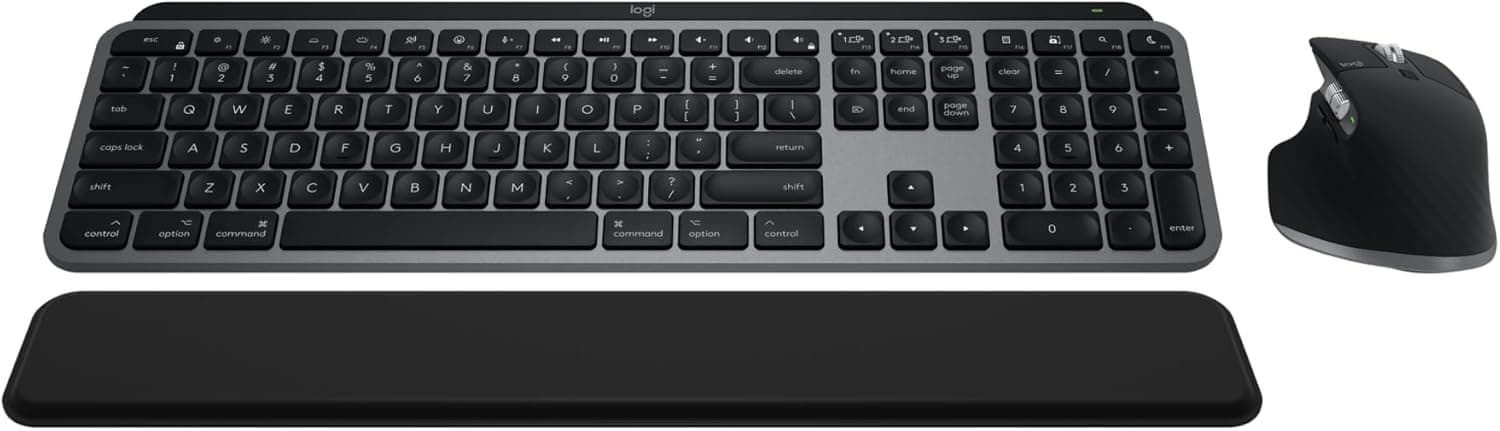
Logitech MX Keys S review UK: Smart Actions AI shortcuts, backlit keys, multi-device pairing. The best productivity keyboard for UK professionals in 2026?
📊 Review Score Breakdown
Disclosure: This article contains affiliate links. If you buy through our links, we may earn a small commission at no extra cost to you.
Logitech MX Keys S Review: The Keyboard That Makes You Faster
Keyboards don't usually get described as AI gadgets, but the Logitech MX Keys S earns the label. The S (Smart) designation refers to a row of programmable Smart Action keys — shortcut buttons you configure via the Logi Options+ software to trigger any sequence of actions: open an app, type a template phrase, switch between apps, trigger AI tools. For knowledge workers who live in their keyboard, this is a genuine productivity multiplier.
Combined with Logitech's acclaimed spherically-curved key design, multi-device pairing, and adaptive backlighting, the MX Keys S is the most considered productivity keyboard currently available.
Quick Verdict
| Rating | ⭐⭐⭐⭐½ 4.6/5 |
| Best for | Knowledge workers, developers, content creators |
| Battery | 10 days backlit / 5 months without |
| Price range | ~£100–£120 |
| Connectivity | Bluetooth (3 devices) + USB receiver |
| Verdict | The best productivity keyboard in the UK — Smart Actions makes customisable AI shortcuts genuinely transformative. |
Typing Experience: Where It Earns Its Price
The spherically dished keys are Logitech's signature MX design — each key is slightly concave in the centre, guiding your fingertip naturally to the correct position. Combined with a stable, weighty base that doesn't flex or slide, typing on the MX Keys S has a satisfying solidity that flat membrane keyboards can't match.
Key travel is moderate — not the deep mechanical feel of a gaming keyboard, but more tactile than slim laptop keyboards. Touch typists generally adapt within minutes and find accuracy improves. The quiet actuation makes it suitable for open offices and video calls without audible keyboard noise distracting participants.
Smart Actions: The AI Productivity Feature
The dedicated Smart Action keys (located at the top of the keyboard) are programmable via Logi Options+ software to any sequence of inputs you define. Examples:
- One key: Opens ChatGPT, pastes clipboard content, and triggers a prompt
- One key: Switches to video call app, mutes microphone, and opens camera
- One key: Inserts a frequently-used email signature or template text
- One key: Triggers your preferred AI writing assistant
This isn't gimmicky — for professionals who repeatedly do the same multi-step actions hundreds of times a day, shaving 10-15 seconds per action compounds significantly over a working week. The Logi Options+ software is polished and makes creating Smart Actions straightforward.
Multi-Device Pairing
Pairing up to three devices (computers, tablets) and switching between them via a dedicated Easy-Switch button is seamless. Press the button once to switch from your work laptop to your personal MacBook — the keyboard adapts to the OS automatically. For professionals with multiple work devices or a home/work setup, this removes the need for multiple keyboards entirely.
Battery Life
The adaptive backlighting (which brightens when your hands approach and dims when you step away) is the main battery consumer. With backlighting: approximately 10 days. Without: up to 5 months. The keyboard charges via USB-C — a quick charge provides several days of use.
Who Should Buy the Logitech MX Keys S?
Perfect for:
- Remote workers and home office setups
- Developers and writers who type all day
- Multi-device users (work + personal setups)
- Anyone wanting to integrate AI tools into their daily workflow
Consider alternatives if:
- You prefer mechanical key action (Logitech MX Mechanical)
- Budget is tight (MX Keys Mini is cheaper with fewer features)
- You need a compact tenkeyless layout
Final Verdict
The Logitech MX Keys S justifies its premium price through exceptional typing feel, genuinely useful Smart Action programmability, and seamless multi-device pairing. For the AI era of work — where keyboard shortcuts to AI tools increasingly define productivity — this keyboard is ahead of the curve.
Rating: 4.6/5 — The productivity keyboard for the modern knowledge worker.