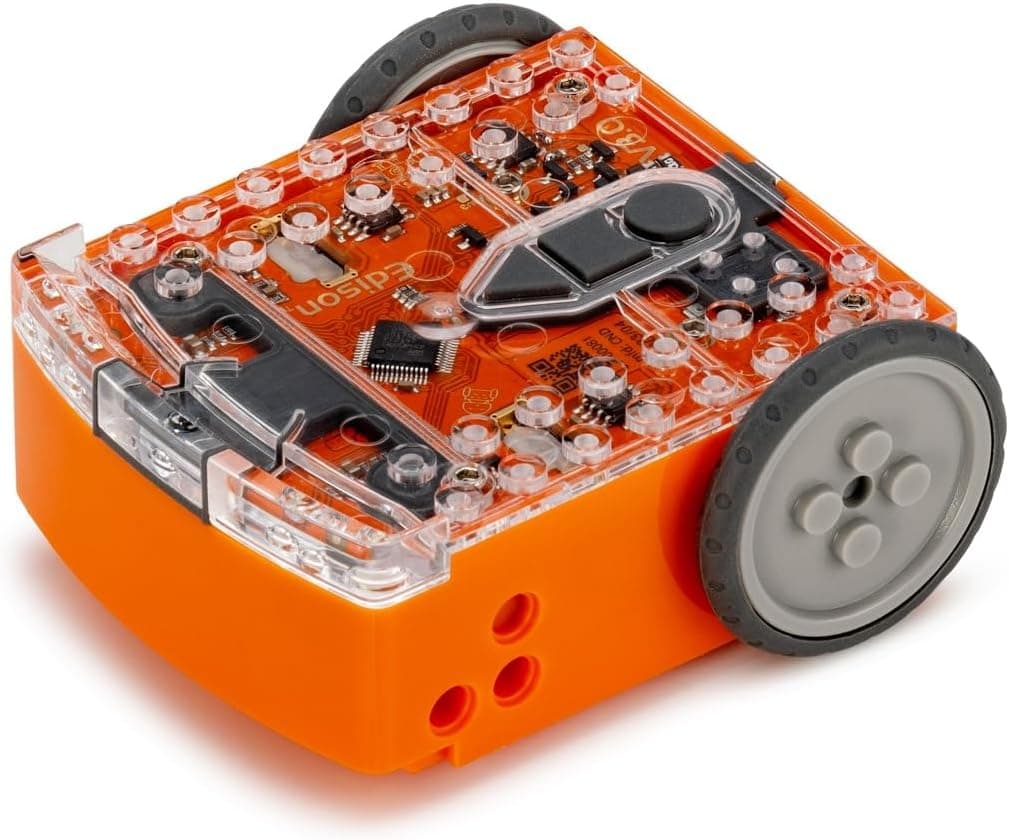
Unlock coding potential with our in-depth review of the Edison V3 Microbric Educational Robot. Learn about its features, programming, and why it's great…
📊 Review Score Breakdown
Quick Verdict: Edison V3 Microbric Educational Robot
The Edison V3 Microbric Educational Robot is a standout choice for parents and educators looking to introduce children aged 4 to 16 to the exciting world of coding and robotics. Its robust design, LEGO compatibility, and versatile programming options—from simple barcode scanning to advanced Python—make it an incredibly adaptable and long-lasting STEM tool. While the initial setup might require a little adult guidance, the Edison V3 offers a comprehensive and engaging learning journey with excellent value for its price. Highly recommended for its educational depth and broad appeal.
In an increasingly digital world, equipping children with foundational coding and STEM skills is more crucial than ever. Educational robots have emerged as a powerful tool in this mission, making complex concepts accessible and fun. Among the crowded market of coding companions, the Edison V3 Microbric Educational Robot shines as a versatile, durable, and remarkably comprehensive option. This isn't just a toy; it's a stepping stone into computational thinking, problem-solving, and the fascinating realm of robotics.
Designed for a remarkably broad age range, from curious preschoolers to budding teenage programmers, the Edison V3 has evolved from its predecessors to offer an even richer learning experience. Its commitment to affordability, combined with significant enhancements like a rechargeable battery and USB programming, positions it as an essential educational resource for both home and classroom environments in the UK.
Build Quality, Design, and LEGO Compatibility
From the moment you unbox the Edison V3, its durability is evident. This isn't a flimsy gadget; it's built to withstand the bumps and tumbles that come with enthusiastic play and learning. Its compact size makes it easy for smaller hands to manage, yet it's substantial enough to feel like a proper robot.
A standout feature is its LEGO compatibility. This opens up a world of creative possibilities, allowing children to customise their Edison V3 with existing LEGO bricks. Imagine building a crane arm for Edison to carry objects, or transforming it into a unique vehicle – the only limit is imagination. This integration not only enhances the play value but also encourages engineering and design thinking, blending physical construction with digital programming.
Diverse Programming Options: Growing with Your Child
The true genius of the Edison V3 lies in its layered approach to programming, catering to different skill levels and learning styles.
1. Barcode Programming (Ages 4+)
For the youngest learners, Edison V3 offers an incredibly intuitive entry point: barcode programming. By simply driving the robot over specially printed barcodes, children can instantly program Edison to perform pre-set commands like following a line, avoiding obstacles, clapping to react, or even playing sounds. This screen-free method is perfect for developing early logical thinking and understanding cause-and-effect without the need for a computer.
2. EdBlocks (Ages 7+)
Stepping up in complexity, EdBlocks provides a visual, drag-and-drop programming environment familiar to those who have used Scratch. This block-based system allows children to construct sequences of commands, loops, and conditional statements. It’s an excellent bridge between abstract thinking and concrete programming, teaching fundamental coding concepts in a highly engaging and digestible format. EdBlocks is accessible directly from a browser, requiring no downloads, making it convenient for use in various settings.
3. EdScratch (Ages 10+)
For a more advanced block-based experience, EdScratch builds upon the popularity of Scratch, offering a richer set of functionalities tailored for the Edison robot. Children can program more intricate behaviours, integrate sensor data, and create sophisticated interactions. It’s a powerful tool for visual learners ready to tackle more complex coding challenges.
4. EdPy (Ages 13+)
Finally, for teenagers and those ready for text-based coding, EdPy allows programming in Python—one of the world's most popular and versatile programming languages. This transition from visual blocks to text provides a crucial step towards "real-world" programming, enabling students to write more complex algorithms and gain valuable skills applicable beyond the robot itself. The ability to progress through these languages within a single robot platform makes Edison V3 an unparalleled tool for sustained learning.
👉 Ready to explore? Check the latest price for the Edison V3 Microbric Educational Robot on Amazon UK
Educational Value and Curriculum Support
The Edison V3 isn't just about making robots move; it's a comprehensive STEM learning package. It inherently teaches:
- Computational Thinking: Breaking down problems, pattern recognition, abstraction, algorithms.
- Problem-Solving: Debugging code and finding creative solutions.
- Logical Reasoning: Understanding sequence, conditions, and loops.
- Robotics Fundamentals: Sensors, actuators, control systems.
- Engineering Principles: Through its LEGO compatibility and project-based learning.
Microbric, the creators of Edison, also offer 10 free lesson plans. These structured activities and guides are invaluable for teachers and parents, providing ready-to-use curriculum content that ensures children get the most out of their robot. From basic movement challenges to complex sensor integration, these lessons support a progressive learning journey.
Who is the Edison V3 For?
Its wide age range of 4 to 16 years is genuinely impressive.
- Younger Children (4-6): Will enjoy the immediate gratification of barcode programming, learning basic commands and cause-and-effect.
- Primary Schoolers (7-11): Will thrive with EdBlocks and EdScratch, building foundational coding logic.
- Teenagers (12-16): Can delve into EdPy to master Python programming in a hands-on, engaging way.
It's an ideal tool for:**
- Parents looking for a long-term educational investment.
- Schools and coding clubs needing an affordable, adaptable, and curriculum-supported robotics platform.
- Gift-givers who want to inspire a love for STEM.
Pros and Cons
Pros:
- Exceptional Value: Offers multiple programming levels in one affordable package.
- Highly Versatile: Grows with your child from visual to text-based coding.
- LEGO Compatible: Expands creative and engineering possibilities.
- Durable Build: Designed to withstand heavy use.
- Comprehensive Support: Free lesson plans and a strong online community.
- Rechargeable Battery: Convenient and eco-friendly.
Cons:
- Initial Learning Curve: While simple to start, mastering all programming levels takes time and commitment (as with any educational tool).
- No Built-in Screen: Relies on external devices for programming interface (computer, tablet).
- Limited Aesthetics: Designed for function and robustness, not fancy looks (though LEGO customisation helps).
Currently available on Amazon UK, the Edison V3 robot. Prices may vary.
Conclusion: A Powerful STEM Companion
The Edison V3 Microbric Educational Robot truly stands out as a champion in the educational robotics space. Its ability to cater to such a wide age range with progressive coding languages ensures that it remains relevant and engaging for years. From teaching the very basics of robotic control with barcodes to empowering students with text-based Python, the Edison V3 is a tool that genuinely fosters a love for STEM. Its durability, LEGO compatibility, and curriculum support make it an intelligent investment for anyone serious about giving children a head start in the digital future.
We give the Edison V3 Microbric Educational Robot a superb 4.8 out of 5 stars.
href="https://www.amazon.co.uk/Edison-V3-Microbric-Educational-Robot/dp/B0CR6VKY7B?tag=padelmad-21" target="_blank" rel="noopener noreferrer" className="inline-block px-8 py-4 text-lg font-bold text-white transition-all duration-300 ease-in-out rounded-lg shadow-lg" style={{ background: 'linear-gradient(to right, #ff9900, #ff6600)' }} > Buy the Edison V3 Robot on Amazon UK
Frequently Asked Questions (FAQs)
Q1: What age is the Edison V3 robot suitable for?
The Edison V3 is designed for a broad age range, from 4 to 16 years old. It offers different programming levels, from simple barcode scanning for young children to Python coding for older students, allowing it to grow with your child.
Q2: Is the Edison V3 compatible with LEGO?
Yes, a fantastic feature of the Edison V3 is its compatibility with LEGO bricks. This allows children and adults to customise the robot, build extensions, and create unique projects, combining physical construction with coding.
Q3: What programming languages can children learn with Edison V3?
The Edison V3 offers a progressive learning pathway through four main programming methods: barcode programming (physical scanning), EdBlocks (simple block-based), EdScratch (advanced block-based, similar to Scratch), and EdPy (text-based Python).
Q4: Does the Edison V3 require batteries?
The Edison V3 comes with a built-in rechargeable battery, which can be charged via a USB cable. This eliminates the need for constant battery replacements, making it more convenient and environmentally friendly.
Q5: Can the Edison V3 be used in schools or classrooms?
Absolutely! The Edison V3 is widely used in educational settings. Microbric provides extensive teaching resources, including 10 free lesson plans, making it an excellent and affordable platform for STEM, coding, and robotics education in schools and coding clubs.
Related Articles
Frequently Asked Questions
Is the Edison V3 compatible with LEGO bricks? Yes — the Edison V3 has been designed with LEGO-compatible studs on its base, making it easy to attach LEGO bricks and build custom chassis or accessories. This dramatically extends creative possibilities.
What age is the Edison V3 suitable for? Edison V3 is suitable for ages 4 and up, though the more advanced Python programming is best suited to ages 10+. The visual block coding makes it accessible to complete beginners.
Does the Edison V3 need an internet connection? No internet connection is required to program or operate Edison V3. The EdScratch and EdPy apps work offline, and programs can be loaded onto the robot using sound signals from a phone or tablet.
How durable is the Edison V3? The Edison V3 is built from a robust ABS plastic that withstands typical classroom and home use. It's been specifically engineered with schools in mind, meaning it can handle drops and general wear.
Who Should Buy the Edison V3?
The Edison V3 is ideal for:
- Schools and educators seeking an affordable, curriculum-aligned coding robot
- Parents wanting a long-lasting coding toy that grows with their child (ages 4–16)
- LEGO enthusiasts who want to bring their builds to life through code
- Beginners looking for a stepping stone from visual coding to Python
It may not suit children who want flashy lights and sounds over substance, or those looking for an AI-driven companion robot.