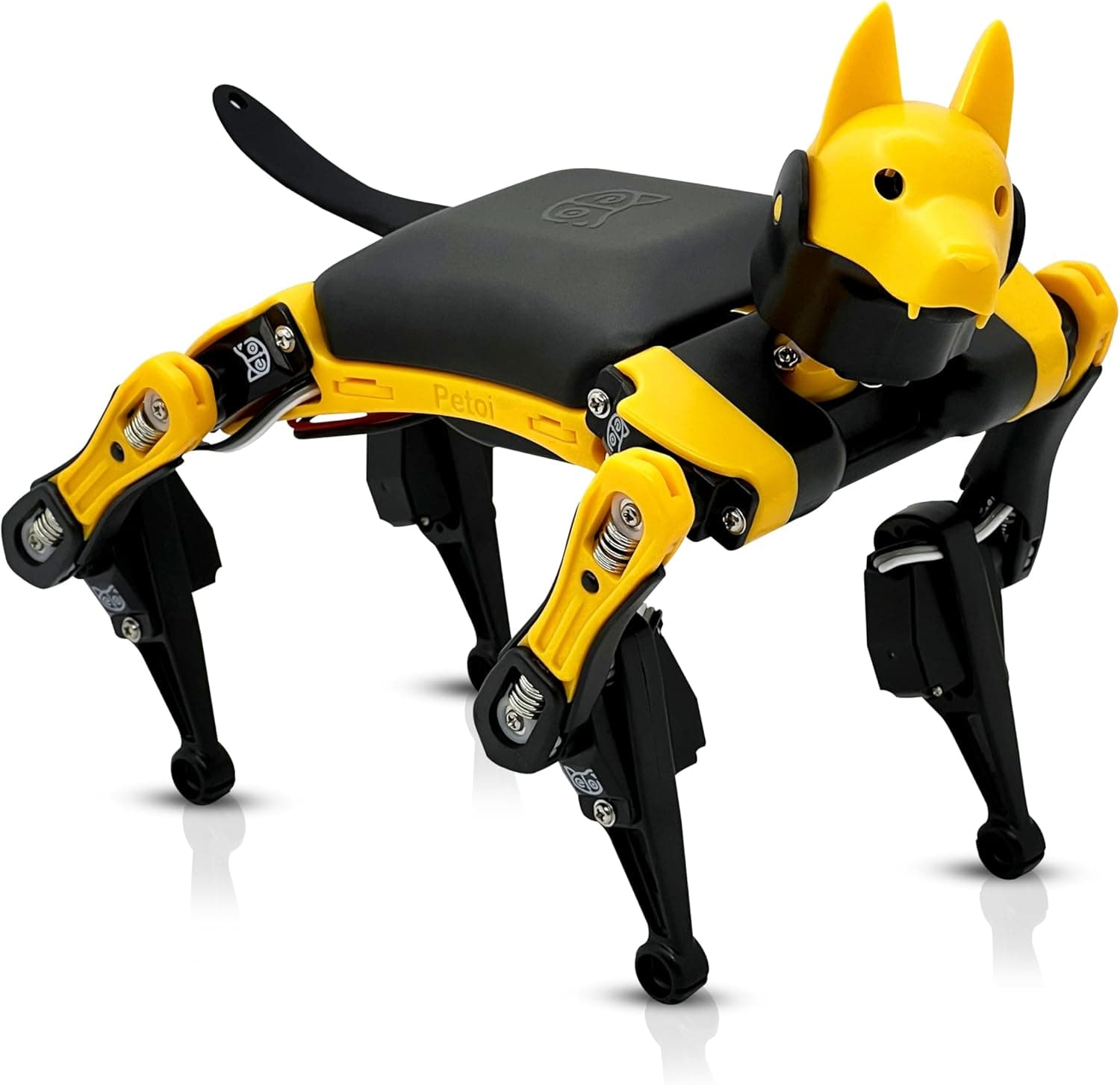
Discover the Petoi Bittle robot dog in our detailed review. Open-source quadruped robot kit with Arduino programming. Perfect for aspiring roboticists.
📊 Review Score Breakdown
Affiliate Disclosure: This review contains affiliate links. If you purchase through these links, we may earn a small commission at no extra cost to you. This helps support our independent testing and reviews.
The Petoi Bittle is something genuinely special in the world of educational robotics. This pint-sized quadruped robot brings the wonder of Boston Dynamics-style walking robots into your home at a fraction of the cost and complexity. After spending several weeks building, programming, and playing with Bittle alongside children aged 12 to 16, we're convinced this is one of the most exciting robotics kits available for aspiring engineers.
Quick Verdict
The Petoi Bittle is a serious robotics kit disguised as an adorable robot dog. It offers genuine engineering education through building, calibration, and programming a real quadruped robot. While the £259.99 price point places it in the premium category, the depth of learning and pure delight it provides justify the investment for committed young roboticists.
Pros:
- Real quadruped locomotion with walking gaits
- Open-source Arduino programming
- Extensive customisation and expansion options
- Active community and regular updates
- Teaches genuine robotics engineering concepts
- Charming personality and movements
Cons:
- Complex assembly (2-3 hours) requires patience
- Calibration can be fiddly and time-consuming
- Higher price point than simpler alternatives
- Some plastic parts feel fragile during assembly
- Requires computer for programming
Rating: 4.6/5 Price: £259.99 Where to Buy: Amazon UK — see button above
Video Review
👉 Interested? Check the latest price for the Petoi Bittle on Amazon UK
Design & Build Quality
The Petoi Bittle arrives as a comprehensive kit that requires significant assembly. This is not a toy you take out of the box and play with immediately—it is a proper engineering project that rewards patience and attention to detail.
Assembly Experience
The building process takes 2-3 hours for someone with experience, or 3-4 hours for first-time builders. The instructions are detailed but assume some familiarity with mechanical assembly. During our testing, we found that children under 14 generally needed adult assistance, though they remained engaged throughout the process.
The assembly involves:
- Installing 9 servo motors in precise orientations
- Connecting the NyBoard (control board) with careful wire routing
- Calibrating each joint to ensure proper movement
- Installing the battery and configuring power management
This is genuinely challenging work, but that's precisely the point. The assembly process teaches:
- How servo motors work and are controlled
- The importance of mechanical precision
- Basic electronics and circuit concepts
- The relationship between hardware and software
Physical Design
Once assembled, Bittle measures approximately 20cm long and 18cm tall—small enough to sit on a desk but large enough to be genuinely impressive when walking. The quadruped design with four legs each having two joints allows for surprisingly lifelike movements.
The construction uses 3D-printed plastic components that are lightweight but reasonably durable. During our testing, Bittle survived numerous falls and tumbles that are inevitable when learning to walk. The servo motors are the same type used in radio-controlled aircraft and are rated for hundreds of hours of operation.
The NyBoard control board is a custom Arduino-compatible board specifically designed for quadruped robots. It includes:
- ATmega328P microcontroller
- 12 servo motor connectors
- Built-in Bluetooth module
- Expansion ports for sensors
- Battery management circuitry
The board is well-designed with clear labelling, though the wire management during assembly requires some care to avoid tangling.
Electronics & Power
Bittle runs on a rechargeable lithium-ion battery pack that provides approximately 45-60 minutes of active movement per charge. The battery charges via USB-C, which is convenient. Power management is handled intelligently—the robot enters a sleep mode when inactive to preserve battery.
Features & Programming
The Petoi Bittle is packed with features that distinguish it from simpler robot toys.
Quadruped Locomotion
Currently available on Petoi Bittle — Amazon UK. Prices may vary.
Bittle's most impressive feature is its walking capability. Using inverse kinematics algorithms, the robot can:
- Walk forward, backward, and sideways
- Turn in place or while walking
- Adjust gait speed from slow creeping to brisk trotting
- Recover from falls and resume walking
- Navigate over small obstacles
Watching Bittle walk for the first time is genuinely magical. The coordinated leg movements create an uncanny resemblance to real animal locomotion. During our testing, children and adults alike were captivated by the robot's movement capabilities.
Pre-Programmed Behaviours
Out of the box (after assembly and calibration), Bittle comes with an impressive repertoire of movements:
Basic Gaits:
- Walk, trot, and crawl modes
- Smooth direction changes
- Variable speed control
Tricks & Behaviours:
- Sit, stand, and balance poses
- Push-ups and other exercise movements
- Play dead and recover
- Greeting and acknowledgment gestures
- Random idle movements that simulate "personality"
These behaviours are accessible through the mobile app or can be triggered by sending serial commands.
Programming Environments
The Petoi Bittle offers multiple ways to program and control the robot, catering to different skill levels:
Mobile App (Beginner) The Petoi app provides a simple interface for:
- Remote control driving
- Triggering pre-programmed behaviours
- Recording and playing back custom movement sequences
- Basic gait adjustments
This is the easiest entry point and allows immediate play after assembly.
Arduino IDE (Intermediate to Advanced) For those ready to dive deeper, Bittle can be programmed using the standard Arduino IDE. This opens up:
- Complete control over all servo motors
- Custom gait development
- Integration of additional sensors
- Communication with other devices
- Access to the full Arduino library ecosystem
The provided code is well-documented and includes examples for common tasks. During testing, our 14-year-old testers were able to modify the walking gait parameters and create custom movement sequences within their first programming session.
Python Programming (Advanced) For users wanting to integrate Bittle into larger projects, Python libraries are available. This enables:
- Control from Raspberry Pi or other computers
- Integration with machine learning projects
- Computer vision applications
- Complex autonomous behaviours
Scratch-like Block Coding (Beginner-Friendly) Petoi also provides a block-based coding interface for younger users, making the robot accessible to children who aren't ready for text-based programming.
Sensors & Expansion
The base Bittle kit includes:
- Ultrasonic distance sensor (for obstacle avoidance)
- Infrared receiver (for remote control)
- Gyroscope and accelerometer (for balance)
The NyBoard includes expansion ports for adding:
- Additional sensors (touch, light, sound)
- Cameras for computer vision
- Additional servos or actuators
- Communication modules
This expandability means Bittle can grow with your skills and interests, remaining relevant for years of exploration.
Age Appropriateness
The Petoi Bittle is officially rated for ages 14+, and we found this to be accurate. However, with adult assistance, younger children can also enjoy and learn from this robot.
Ages 12-14 (with supervision): At this level, children can complete most of the assembly with adult guidance, particularly for the trickier calibration steps. They can use the mobile app for control and experiment with the block-based coding. The experience is more about building and playing than deep programming, but still highly educational.
Ages 15-17: This is the sweet spot for Bittle. Teenagers at this level can handle the assembly independently, understand the calibration process, and begin modifying the Arduino code. They can explore inverse kinematics concepts, experiment with different gaits, and integrate additional sensors. We observed this age group creating impressive projects including autonomous navigation and voice-activated commands.
Ages 18+ (including adults): Bittle is not just for children. Adult hobbyists and students will find plenty of depth in this kit. The open-source nature means you can modify any aspect of the robot's behaviour, and the active community provides inspiration and support for advanced projects.
University Level: Bittle has been used in university robotics courses as an affordable platform for studying quadruped locomotion. The algorithms and concepts transfer directly to larger, more expensive robots.
Value for Money
At £259.99, the Petoi Bittle is a significant investment. To assess its value, we need to consider what you're getting:
What's Included:
- Complete robot kit with all plastic parts
- 9 high-quality servo motors
- NyBoard control board
- Rechargeable battery and charger
- Ultrasonic sensor
- Assembly tools and screws
- Access to all software and documentation
Educational Value: Bittle teaches genuine robotics engineering concepts including:
- Mechanical assembly and precision
- Servo motor control
- Inverse kinematics and gait generation
- Embedded programming
- Sensor integration
These are the same concepts taught in university robotics courses, made accessible through an affordable kit.
Comparison to Alternatives:
- Lego Mindstorms (£329.99): More building flexibility, less impressive walking
- Boston Dynamics Spot (not available to consumers): Professional-grade quadruped, thousands of pounds
- Other quadruped kits (£400+): Similar capabilities, higher prices
- Simple wheeled robots (£50-100): Much cheaper, far less capable
Longevity: Unlike toys that are discarded after a few months, Bittle offers years of exploration. The open-source nature means it will never become obsolete, and the community continues to develop new features and capabilities.
Verdict: For families serious about robotics education, the Petoi Bittle represents excellent value. It provides university-level learning experiences at a fraction of the cost of comparable platforms. However, for casual users or those seeking simple play, the investment may not be justified.
Competitor Comparison
Petoi Bittle vs Lego Mindstorms Robot Inventor
Key Differences:
- Locomotion: Bittle walks on legs; Mindstorms typically uses wheels
- Programming: Both offer block and text coding; Bittle uses Arduino, Mindstorms uses proprietary language
- Building: Mindstorms offers more building flexibility; Bittle has a fixed quadruped design
- Community: Mindstorms has larger community; Bittle has more focused quadruped community
- Price: Bittle (£259.99) is cheaper than Mindstorms (£329.99)
Verdict: Choose Bittle if you specifically want quadruped locomotion and open-source flexibility. Choose Mindstorms for more general robotics building and larger community.
Petoi Bittle vs Wheeled Coding Robots
Key Differences:
- Movement: Bittle walks on legs; wheeled robots roll
- Complexity: Bittle is significantly more complex
- Price: Wheeled robots (£50-150) are cheaper than Bittle (£259.99)
- Learning: Bittle teaches advanced robotics; wheeled robots teach basic programming
Verdict: Choose wheeled robots for younger children or basic programming introduction. Choose Bittle for serious robotics enthusiasts ready for advanced learning.
Petoi Bittle vs DIY Arduino Robots
Key Differences:
- Convenience: Bittle is a complete kit; DIY requires sourcing parts
- Documentation: Bittle has excellent documentation; DIY relies on scattered resources
- Design: Bittle is professionally designed and tested; DIY quality varies
- Support: Bittle has company support and warranty; DIY is self-supported
- Price: DIY can be cheaper but requires significant time investment
Verdict: Choose Bittle for a polished, supported experience. Choose DIY if you enjoy the challenge of sourcing and figuring out everything yourself.
Frequently Asked Questions
How difficult is the assembly?
The assembly is genuinely challenging and requires 2-4 hours of focused work. The instructions are clear but assume some familiarity with mechanical assembly. Children under 14 will likely need adult assistance, particularly for the calibration phase where precise adjustments are critical. The most challenging parts are routing the servo wires neatly and calibrating the joint positions. However, this challenge is part of the educational value—you will genuinely learn about robotics mechanics through the assembly process.
Can Bittle walk on carpet?
Bittle can walk on low-pile carpet, but it performs best on hard surfaces like wood, tile, or smooth concrete. High-pile carpet can catch the feet and cause the robot to stumble. During our testing, Bittle successfully navigated across room transitions (hardwood to carpet) without issue, though movement was noticeably smoother on hard floors. The robot's ability to adjust its gait helps compensate for different surfaces.
What happens if Bittle falls over?
Bittle includes a gyroscope that detects falls and triggers a recovery routine. When the robot detects that it has fallen, it will attempt to get back up by executing a series of coordinated leg movements. This works remarkably well most of the time, though very awkward falls may require manual intervention. The plastic construction and servo design mean that falls generally don't cause damage, though repeated hard falls onto hard surfaces should be avoided.
Can I add a camera or other sensors?
Yes, the NyBoard includes expansion ports specifically designed for adding sensors and peripherals. The community has successfully integrated:
- Raspberry Pi cameras for computer vision
- Additional ultrasonic sensors for better obstacle detection
- Touch sensors for responsive behaviours
- Light sensors for light-following behaviours
- Sound sensors for voice activation
The Arduino-compatible nature means any sensor that works with Arduino can potentially be integrated with Bittle, though this requires some programming knowledge.
Is programming experience required?
No programming experience is required to enjoy Bittle. The mobile app provides immediate control and access to pre-programmed behaviours. However, to unlock the robot's full potential, some programming knowledge is beneficial. The block-based coding interface allows beginners to create custom behaviours without writing code, while the Arduino environment offers deeper exploration for those ready to learn. Petoi provides extensive tutorials that guide beginners through their first programming projects.
Final Verdict
The Petoi Bittle is a remarkable achievement in educational robotics. It manages to package sophisticated quadruped locomotion technology into an affordable, buildable kit that genuinely teaches engineering principles.
What makes Bittle special is the combination of immediate delight and long-term depth. The first time you see it walk across the floor is genuinely magical, but the real value comes from the months and years of learning that follow. The open-source approach means this robot will never become obsolete—you can continue modifying, improving, and learning from it indefinitely.
However, Bittle is not for everyone. The assembly requires patience and some technical aptitude. The calibration process can be frustrating for perfectionists. And the price point makes it a significant investment that only makes sense for committed learners.
Who should buy the Petoi Bittle?
- Teenagers and adults with genuine interest in robotics
- Students considering engineering or computer science careers
- Families who enjoy building and tinkering together
- Makers looking for an accessible quadruped platform
- Educators teaching advanced robotics concepts
Who should look elsewhere?
- Young children under 12 without patient adult supervision
- Those seeking immediate out-of-box play
- Users wanting simple, app-controlled toys
- Anyone not interested in programming or technical challenges
The Petoi Bittle earns a rating of 4.6 out of 5. It loses points for the fiddly calibration and some fragile-feeling plastic parts, but gains them back many times over through its capabilities, educational value, and sheer delight factor. For the right user, this robot is an investment in years of learning and enjoyment.
Ready to build your own walking robot companion? Get the Petoi Bittle on Amazon UK and start your quadruped robotics adventure today.