Full hands-on review of the DJI Ryze Tello EDU programmable drone. UK pricing, coding features, flight time, and verdict. Is it the best coding drone for kids?
📊 Review Score Breakdown
Affiliate disclosure: AIToys.co.uk earns a small commission on purchases made through our Amazon links, at no extra cost to you. This never influences our editorial scores or opinions.
DJI Ryze Tello EDU Review UK 2026 — The Best Coding Drone for Kids?
When a drone lands on your child's wish list, the questions come thick and fast: Is it safe? Is it easy to fly? And is it actually educational, or just a gimmick? The DJI Ryze Tello EDU is one of the few drones on the market that genuinely tries to answer "yes" to all three. Powered by DJI's legendary flight technology and built for the classroom as much as the living room, the Tello EDU is a small drone with serious STEM credentials.
We put it through its paces over several weeks — indoors and outdoors, with beginners and with kids who already know their way around a block of Scratch code. Here's our full verdict.
Quick Verdict
| Rating | ⭐⭐⭐⭐ 4.4 / 5 |
| Best for | Ages 12+ (supervised from age 10) |
| Price | Around £100–£120 on Amazon UK |
| Programming | Scratch, Python, Swift, SDK 2.0 |
| Flight time | ~13 minutes per charge |
| Verdict | A genuinely exceptional coding drone — small, safe, and surprisingly capable. A few rough edges around the app setup, but nothing that a determined young coder can't crack. |
What Is the DJI Ryze Tello EDU?
The Tello EDU is the educational sibling of the original Ryze Tello drone. While the standard Tello is perfectly fine for flying fun, the EDU model unlocks several extra features specifically designed for learning and STEM education:
- Scratch programming via the dedicated Tello EDU app
- Python, Swift, and SDK 2.0 support for advanced users
- Mission Pad detection — optical sensors can read special landing pads, enabling autonomous navigation missions
- Swarm flying support — multiple Tello EDUs can be programmed to fly in formation (great for classrooms)
It's a drone that starts off as a fun flying toy and progressively reveals deeper layers of functionality as your child's skills grow. That long runway is what makes it genuinely special.
Unboxing & What's in the Box
The Tello EDU comes in no-nonsense packaging — this is clearly aimed at schools as much as consumers. In the box:
- Tello EDU drone
- 1,100mAh rechargeable battery (built-in, cannot be swapped mid-flight)
- Micro USB charging cable
- Propeller guards
- A quick-start guide
Notably absent: a controller. The Tello EDU is flown via smartphone app (iOS or Android), which has divided opinion. For many older kids, a phone controller actually feels natural. For younger children, or if you want a physical gamepad feel, you'll need a compatible Bluetooth gamepad (third-party options available for around £20–30).
YouTube: Watch It in Action
Design & Build Quality
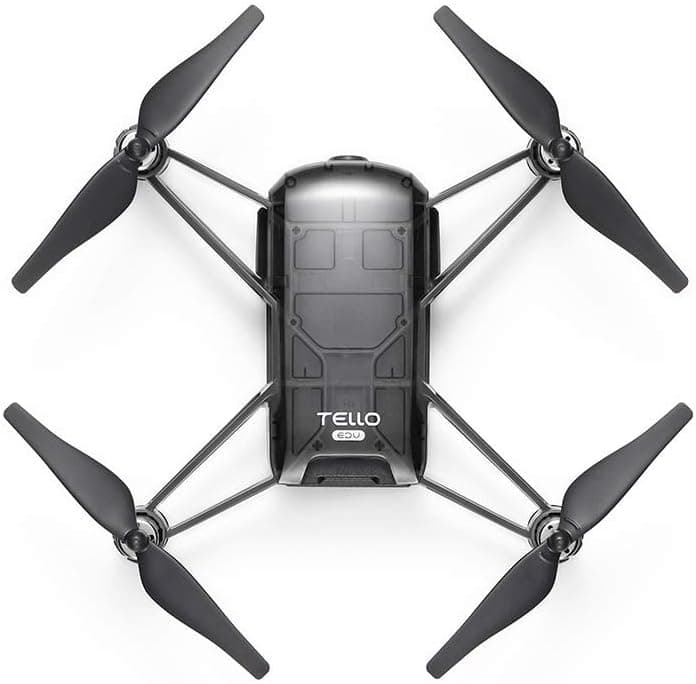
At just 80g, the Tello EDU is remarkably light. It fits in the palm of your hand, and the propeller guards clip on easily to protect walls, furniture, and small fingers during indoor flights. The plastic feels durable enough for classroom use, though we wouldn't recommend dropping it from height without guards attached.
The bright white body is clean and modern — it looks like a toy, but flies with considerably more precision than most drones at this price point. DJI's Electronic Image Stabilisation (EIS) and optical flow sensor keep it remarkably steady indoors, even when it catches a slight draught.
One thing to note: the battery is internal and charges via Micro USB. This means you're grounded for about 60–90 minutes between flights. For extended play sessions, a second battery (sold separately) is a worthwhile investment — though these can be tricky to source in the UK.
Flying the Tello EDU
Setup
This is where some parents hit their first snag. There are two Tello apps:
- Tello — for first activation, firmware updates, and manual flying
- Tello EDU — for block coding and educational missions
You must use the Tello app first to activate the drone and install firmware before switching to the EDU app. This isn't made obvious in the box, and has caught out many buyers (as reflected in Amazon UK reviews). Once you know this, it takes about 10 minutes to get airborne — and it's smooth sailing after that.
Flight Performance
The Tello EDU flies beautifully indoors. DJI's downward-facing vision system keeps it remarkably stable when hovering, and the automatic takeoff/landing features make it genuinely beginner-friendly. We flew it in a standard living room without any major mishaps, though we'd recommend clearing a 3m × 3m space minimum.
Outdoors is a different matter. Like all small drones, the Tello EDU struggles in any meaningful wind — anything above a light breeze and you'll be fighting for control. Keep it indoors or wait for still, calm days. This isn't a criticism unique to the Tello EDU; it's simply physics at this weight class.
Flight time: approximately 13 minutes per charge. In practice, you'll get 10–12 minutes of active flying with takeoffs, manoeuvres, and gentle coding missions.
Speed & Manoeuvres
In manual mode, the Tello EDU can reach around 8m/s and pull off a range of flips and stunts — more than enough to keep the novelty going. But the real fun begins in the EDU app.
The Coding Experience
This is where the Tello EDU earns its STEM stripes.
Scratch Block Coding (Ages 10+)
The Tello EDU app features a Scratch-based block coding interface that lets children program flight sequences. You drag and drop command blocks — "take off", "fly forward 50cm", "rotate 90°", "land" — and then run the programme. It's immediately satisfying: your code causes a real physical object to move through the air.
Our testers (aged 11 and 13) were coding basic obstacle-course sequences within 30 minutes of their first flight. The learning curve is gentle but rewarding.
Python & Swift (Ages 14+)
For older children or those with coding experience, the Tello EDU exposes a full SDK 2.0 API. You can control the drone entirely from Python or Swift — sending commands over a local Wi-Fi connection. This opens up genuinely exciting possibilities:
- Autonomous navigation programmes
- Computer vision experiments (the 5MP front camera streams HD 720p video)
- Data logging (the drone reports back battery level, speed, acceleration, and more)
- Swarm missions: programme multiple Tello EDUs to fly in formation — an incredible classroom demo
This is not a toy for five-year-olds. But for secondary school students with a budding interest in programming, robotics, or engineering, it's one of the most impressive educational tools at this price point.
👉 Interested? Check the latest price for the Ryze Tello EDU on Amazon UK
Mission Pads
Mission Pads are optional accessories (sold separately) that the drone can detect via its optical sensor. You can programme sequences where the drone takes off, flies to a specific pad, and performs an action upon detection. This adds a spatial reasoning layer to coding challenges — great for structured classroom activities.
Camera Quality
The Tello EDU sports a 5MP camera capable of 720p HD video. It's no action camera, but it's genuinely usable for:
- First-person view (FPV) flying via the app
- Short video clips (smooth thanks to EIS)
- Image capture for programming experiments
For an educational coding drone, the camera is a bonus rather than a headline feature. Don't buy the Tello EDU expecting Instagram-worthy aerial footage — but do expect usable, stable footage for projects and experiments.
Pros & Cons
✅ Pros
- DJI flight quality at an affordable price — remarkably stable indoor flight
- Multiple coding languages — Scratch, Python, Swift, SDK 2.0
- Great long-term depth — grows with your child's skills
- Swarm flying — fantastic for classrooms
- Propeller guards included — genuinely safe for indoor use
- Active community — plenty of tutorials, lesson plans, and community resources online
- Compact and portable — fits in a bag easily
❌ Cons
- Two-app setup confusion — must use Tello app first, then EDU app (not clearly explained)
- No physical controller in the box — smartphone control only
- Short flight time — ~13 minutes per charge
- Battery swap is not hot-swappable — must charge internally (60–90 min)
- Weak in wind — indoor use or calm days only
- Mission Pads sold separately — adds to cost if you want full classroom functionality
- Tello EDU app last updated 2022 — still works, but feeling slightly dated
Who Is It Best For?
The Tello EDU is a genuinely excellent buy in the right hands, but it's not for everyone:
Buy it if:
- Your child is aged 10+ with some interest in coding or technology
- You're a teacher looking for an engaging STEM classroom tool
- You want a drone that will still be interesting in 2–3 years as their skills develop
- You're looking for something more educational than a pure flying toy
Look elsewhere if:
- Your child is under 10 — the abstract programming concepts will frustrate rather than engage younger kids
- You need longer flight times or outdoor performance
- You want a traditional drone with a physical controller from the off
For younger children (5–9), we'd suggest starting with something like the Botley 2.0 Robot or BBC micro:bit V2 to build coding foundations before jumping to drones. If drones are the goal, our drone toys buying guide covers the full range from beginner to advanced.
How Does It Compare?
| Tello EDU | DJI Mini 4K | Parrot Mambo | |
| Price | ~£110 | ~£270 | ~£80 |
| Programming | Scratch, Python, Swift | None | Python (limited) |
| Flight time | 13 min | 34 min | 10 min |
| Indoor safety | Excellent (guards) | Not recommended | Good |
| Best for | STEM coding | Photography | Beginners |
The Tello EDU occupies a unique sweet spot: it's the only drone at this price that offers real multi-language programming with the flight quality and safety of a premium manufacturer. The Parrot Mambo is cheaper but far more limited; DJI's own consumer drones are for photography, not STEM education.
UK Regulations: What You Need to Know
All drone owners in the UK must be aware of CAA regulations. At 80g, the Tello EDU falls below the 250g threshold and is classified as a C0 or unlisted drone — which means:
- No operator registration required (under 250g)
- Still must follow basic rules: no flying over people, stay below 400ft, line of sight only
- Indoor use: entirely unrestricted — no registration needed
This makes the Tello EDU particularly attractive for home and classroom use. Always check the CAA Drone Code for the latest guidance before flying outdoors.
Value for Money
At £100–£120, the Tello EDU is a considered purchase — it's not an impulse buy. But compared to other STEM coding tools at similar price points (Sphero BOLT at ~£120, LEGO Technic sets, BBC micro:bit kits), the Tello EDU offers a genuinely unique proposition: physical, tangible programming results in three-dimensional space.
There's something deeply motivating about writing a few lines of Scratch code and watching a real drone execute your instructions in mid-air. That "wow" moment is worth a great deal in terms of sustained engagement with STEM subjects.
Currently available on Ryze Tello EDU — Amazon UK. Prices may vary.
FAQ
What age is the DJI Tello EDU suitable for?
The Tello EDU is best suited to children aged 10 and above. Younger children can enjoy supervised manual flying from around 8, but the coding features require a level of abstract thinking that typically develops from age 10–11. For pure drone fun with younger kids, consider the standard Tello (no EDU features) or look at our drone toys buying guide for age-appropriate alternatives.
Do I need a controller for the Tello EDU?
The Tello EDU is controlled via smartphone app (iOS or Android) out of the box — no physical controller is included. A compatible Bluetooth gamepad can be paired for a more traditional flying experience, but the app control works well once you get used to it.
Can you fly the Tello EDU outside?
Yes, but it's primarily an indoor drone. It handles calm outdoor conditions fine, but any meaningful wind will destabilise it significantly. Stick to indoors for coding missions and calm outdoor days for exploratory flying.
What programming languages does the Tello EDU support?
Scratch (via the Tello EDU app), Python, Swift, and SDK 2.0 for custom applications. It also supports RoboMaster EDU for more advanced robotic programming, making it genuinely versatile for different age groups and skill levels.
Is the Tello EDU the same as the regular DJI Tello?
They use the same core drone hardware, but the EDU model adds Mission Pad detection, swarm flying capability, full SDK 2.0 access (including Python and Swift), and a dedicated educational app with Scratch coding. The standard Tello supports basic block coding only.
Final Verdict
The DJI Ryze Tello EDU is a genuinely impressive piece of STEM kit. It's not perfect — the two-app setup is unnecessarily confusing, the battery life is modest, and it's essentially useless in any wind — but these are minor frustrations in the context of what it achieves.
For a motivated 10–14-year-old with an interest in coding, engineering, or just the thrill of programming something that actually flies, the Tello EDU delivers an experience that no tablet app or stationary robot can match. The progression from Scratch blocks to Python commands to swarm coordination is a genuine learning journey, and one that holds its excitement for months.
If you're buying a first coding drone for a curious, tech-interested young person, there is no better choice at this price.
Rating: 4.4 / 5 ⭐⭐⭐⭐
Also consider: our Best Coding Robots Under £100 roundup if you're weighing the Tello EDU against ground-based alternatives, or our Best STEM Toys UK 2026 guide for a broader comparison.