Honest Miko 3 review for UK parents. We test AI conversations, educational features, safety controls, and the Max subscription. Full verdict with pros & cons.
📊 Review Score Breakdown
Affiliate disclosure: This article contains affiliate links. If you buy through our links, we may earn a small commission at no extra cost to you. This helps keep AIToys.co.uk running.
The Miko 3 is one of the most talked-about AI companion robots for children — an expressive, wheel-based robot that promises to keep kids aged 5–10 entertained while sneaking in some genuine educational value. But at around £130–£160 on Amazon UK (and with an optional subscription adding to the cost), is it actually worth it?
We've spent time thoroughly evaluating the Miko 3 across its AI features, educational apps, build quality, and the all-important parental controls. Here's our honest verdict.
Quick Verdict
As of March 2026, the Miko 3 robot is no longer consistently available on Amazon UK. We recommend checking the official Miko website for current availability, or considering the Miko Mini as a newer alternative.
Video Review
What Is the Miko 3?
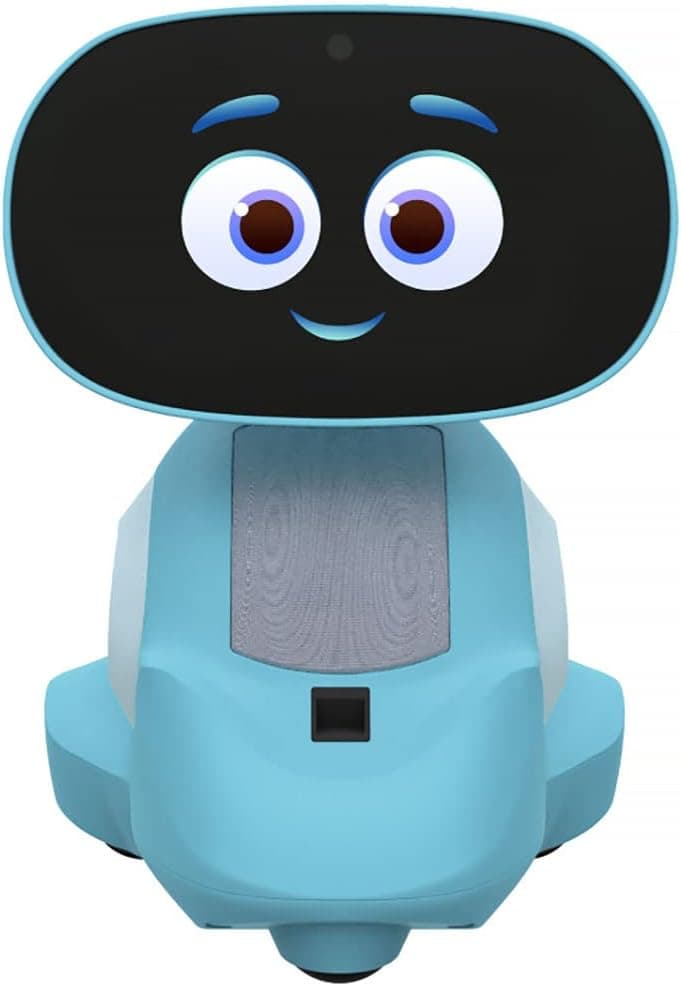
The Miko 3 is an AI-powered educational companion robot made by the Indian company Miko. It launched in 2022 and sits below the more advanced Miko Mini in the product lineup. Think of it as a tablet in a robot body — it has a bright touchscreen face, rubberised wheels, a HD camera, and dual microphones, all wrapped in a chunky, kid-friendly ABS plastic shell.
At just under 9 inches tall and weighing around 900g, it's the right size for small hands to interact with but won't tip over easily during play. It connects to your home Wi-Fi and pairs with a parent app on your smartphone for usage monitoring and content controls.
Key Specs at a Glance
| Feature | Details |
| Age range | 5–10 years |
| Display | 720p IPS capacitive touchscreen |
| Camera | Wide-angle HD (720p) |
| Battery | 4–6 hours of active use; ~4 hours charging |
| Connectivity | Wi-Fi (2.4GHz) |
| Dimensions | 16cm L × 14cm W × 22cm H |
| AI features | Deep learning AI, voice recognition, face recognition |
| Coding | No (see Miko Mini for coding features) |
| COPPA compliant | Yes |
What's In The Box?
- Miko 3 robot
- USB-C charging cable and adaptor (with UK, EU, and US plugs)
- Quick start guide
- Information booklet
The setup is notably simple. Plug it in, download the free Miko parent app on your phone, connect to Wi-Fi, and you're up and running in under 10 minutes. There's no fiddly assembly, no AA batteries, and no pairing headaches.
Design & Build Quality
The Miko 3 has clearly been built with durability in mind. The rugged ABS body and rubberised wheels mean it survives the kind of rough treatment a 6-year-old will inevitably dish out. There are no sharp edges, the charging port is recessed, and the display — while prominent — sits within a protective bezel.
The expressive LCD face is the centrepiece. Miko uses it to display animated eyes and facial expressions that react to what your child says and does. When a child tells it a joke, its face lights up with a wide grin. When it's asked a question, it looks thoughtful. It sounds small, but it makes a big difference to how "alive" the robot feels — kids genuinely respond to it.
The speakers are surprisingly loud for the robot's size. They get plenty loud enough for a bedroom or living room, and parents can limit the maximum volume via the app (a welcome feature). Stereo separation is minimal, but the audio quality is more than acceptable.
The bottom-mounted wheels let Miko navigate around flat surfaces. It doesn't climb carpets or navigate stairs, but it trundles around smoothly on hard floors and low-pile rugs. The odometric sensors keep it from bumping into furniture (most of the time), and a time-of-flight range sensor helps it avoid edges and drops.
One thing worth noting: the wheels do make noise on hard floors, which some parents find annoying. If your child's bedroom has laminate flooring, you'll hear Miko approaching from the hallway.
AI Features & Personality
This is where Miko 3 shines brightest. Powered by deep-learning AI, Miko engages in surprisingly natural, age-appropriate conversations with children. Ask it about dinosaurs, tell it about your day, or request a silly joke — it handles all of these with warmth and appropriate responses.
The AI is contextually aware within a session, meaning it can follow a conversation thread rather than treating each statement as completely separate. It also adapts to each child's profile over time, learning names, interests, and communication styles.
👉 Curious about how Miko compares to its successor? Read our Miko Mini Review for a full side-by-side breakdown.
Face and voice recognition work reasonably well. After a brief setup period, Miko can identify individual children and switch between profiles accordingly. This is genuinely useful in families with multiple kids. It's not perfect — bright backlighting or low-light conditions can confuse it — but it works well enough to feel magical.
The emotional responsiveness deserves special mention. Miko modulates its tone and expressions depending on the emotional cues in a conversation. Children who are clearly excited get a more animated Miko; quieter interactions produce a calmer, gentler response. It's a thoughtful implementation that makes it feel far less robotic than you'd expect.
Educational Content
Here's where things get more complicated — and where the Miko Max subscription becomes a real consideration.
Free Tier Content
Without a Max subscription, your child gets:
- Spell Bee — a word spelling game (full access)
- Learning Buddy — Q&A and general knowledge (limited to a handful of daily interactions)
- Story Maker — short stories with AI-generated twists (limited to one story at a time)
- Lingo Kids — language learning games (limited access)
- Dance Master — interactive dance game (full access)
- Limited Disney and Paramount stories
The free tier is enough to demonstrate what Miko can do, but in practice it gets old fast. The limitations kick in quickly — a curious child will hit the paywall within 20–30 minutes of exploring. If you're buying Miko 3 without any intention of subscribing, expect some frustrated reactions.
Currently available on Amazon UK — check the latest Miko 3 price. Prices may vary.
With Miko Max Subscription
The Max subscription (approximately £8–£15/month or better value on annual plans) unlocks a substantially better experience:
- Full access to all Learning Buddy interactions
- Complete Story Maker library with new content monthly
- Full Lingo Kids language learning (15+ languages)
- iHeart Music for kids
- Full Disney, Paramount, and Mattel show content
- DaVinci games
- Enhanced parental progress reports
For younger children aged 5–7 in particular, the Max content is genuinely valuable. There's enough variety to keep them engaged for weeks, and the monthly updates help prevent content fatigue.
A note on learning outcomes: Miko 3 isn't a replacement for a dedicated coding toy like the BBC micro:bit V2 or Botley 2.0, and it doesn't teach programming. It's stronger at general knowledge, creative storytelling, language development, and emotional engagement. Think of it as an AI tutor and companion, not a coding teacher.
Safety & Parental Controls
Miko takes child safety seriously, and this is one of the robot's strongest selling points for UK parents.
COPPA compliance means Miko 3 meets rigorous US children's privacy standards — it doesn't store identifiable voice recordings, and data practices are designed with children's privacy in mind. The KidSafe Seal certification provides additional third-party verification.
The parent app (available for iOS and Android) gives you:
- Screen time management — set daily usage limits and scheduled off times
- Content controls — lock specific apps or categories
- Progress reports — see which content your child is engaging with (Max feature)
- Volume controls — cap the maximum volume
- Camera and microphone disable — turn off hardware sensors with a single tap
The one-tap camera/microphone disable is worth highlighting. In an era of smart home device privacy concerns, the ability to physically disable these sensors from the app provides genuine peace of mind for parents who are concerned about connected devices in children's bedrooms.
👉 Worried about connected toy safety? Read our guide on Are AI Toys Safe for Children? for a balanced look at what to check before buying.
Battery Life
Miko 3 offers 4–6 hours of active use on a full charge, with the variance depending on how intensively it's being used. Continuous video playback drains it faster; lighter conversational use extends battery life.
Charging takes approximately 4 hours via the USB-C cable. There's no wireless charging or quick charge support, which is a minor disappointment at this price point. The robot will warn your child when battery levels are low, which is a nice touch.
Standby battery drain is higher than it should be — Miko 3 drains noticeably even when "asleep" and idle. If your child isn't going to use it for a couple of days, turning it off fully (rather than leaving it on standby) is recommended.
Miko 3 vs Miko Mini: Which Should You Buy?
Since both robots are currently available on Amazon UK, this is the question most parents will be wrestling with.
| Feature | Miko 3 | Miko Mini |
| Price | ~£130–£160 | ~£180–£220 |
| Age range | 5–10 | 5–12 |
| Display | 720p IPS | Higher resolution |
| Coding features | None | Basic intro to coding |
| AI quality | Good | Better contextual AI |
| Content library | Good (with Max) | More comprehensive |
| Design | Chunky, durable | Sleeker |
If budget is a consideration, the Miko 3 represents solid value — it delivers the core experience (AI companion, entertainment, parental controls) at a lower price. The Miko Mini is worth the extra outlay if you want a longer-lasting product that'll engage older children and teenagers.
For a 5–8 year old, Miko 3 is a perfectly capable choice. For a 9–10 year old or if you want the toy to grow with your child, invest in the Miko Mini.
Pros & Cons
✅ Pros
- Excellent AI personality — feels genuinely alive
- Great build quality, survives kids' rough handling
- Strong parental controls with one-tap mic/camera disable
- COPPA-compliant and KidSafe certified
- Face and voice recognition works well
- Good UK plug included in the box
- Max subscription content is genuinely high quality
❌ Cons
- Free tier is too limited — Max subscription is near-essential
- Higher-than-expected standby battery drain
- Wheels are noisy on hard floors
- No coding features (unlike some rivals)
- Subscription cost adds up over time
- Knowledge-level responses can be too advanced for younger ages
Who Is Miko 3 Best For?
Best for:
- Children aged 5–8 who love chatting, asking questions, and imaginative play
- Families happy to consider the Max subscription for best value
- Parents wanting strong privacy controls on connected toys
- Children who aren't yet ready for dedicated coding robots
Not ideal for:
- Parents expecting a coding or STEM learning tool (look at Sphero BOLT or BBC micro:bit V2 instead)
- Children aged 9+ who may quickly outgrow the content level
- Buyers unwilling to pay for the Max subscription on top of the robot cost
FAQ
Is the Miko 3 available in the UK? Yes — Miko 3 was previously available on Amazon UK, but availability is now inconsistent. We recommend checking the official Miko website for purchasing options.
What age is the Miko 3 suitable for? Miko markets it for ages 5–10, and that's a realistic range. Younger children (under 5) may find the interactions too complex; children aged 10+ may find it too childlike. The sweet spot is ages 6–8.
Do I need the Miko Max subscription? You can use Miko 3 without it, but the free tier is quite restrictive. Most parents who buy the robot end up subscribing. Factor this cost into your decision — it adds around £8–£15/month on top of the hardware cost.
Does Miko 3 work without Wi-Fi? No — Miko 3 requires a Wi-Fi connection for its AI features, content, and parent app. Very limited offline functionality is available, but the core experience depends on connectivity.
Is Miko 3 safe for children's bedrooms? Yes, with appropriate settings. The parent app allows you to disable the camera and microphone entirely, set time limits, and monitor usage. Miko is COPPA-compliant and KidSafe certified.
What's the difference between Miko 3 and Miko Mini? Miko Mini has a higher-resolution display, improved AI, basic coding features, and is aimed at a slightly broader age range (5–12). Miko 3 is the more affordable option with a strong core experience. Read our full Miko Mini review for a detailed comparison.
Our Verdict — 4.1/5
The Miko 3 is a genuinely enjoyable AI companion robot that gets more right than wrong. Its personality is charming, its safety credentials are solid, and for the right age group — a curious 5–8 year old who loves chatting — it delivers meaningful entertainment and some real educational value.
The key caveat is the subscription model. If you're happy to factor in the Max subscription cost, Miko 3 becomes a much stronger proposition. If you're expecting the hardware purchase to be the end of the spending, you'll find the free tier disappointing.
Compared to simpler coding robots like the Botley 2.0 or the Edison V3, Miko 3 is a fundamentally different product — it's a companion and entertainer first, an educator second. If your child is after something to teach them coding, look elsewhere. If they want a robot friend that tells jokes, plays games, and keeps them engaged, Miko 3 delivers.
Rating: 4.1 / 5 ⭐⭐⭐⭐
As of March 2026, the Miko 3 robot is no longer consistently available on Amazon UK. We recommend checking the official Miko website for current availability, or considering the Miko Mini as a newer alternative.
Prices and availability are correct at time of writing and may change. Always check the current Amazon UK listing for the latest price.